Home / Planner
Oopbuy storage deadline planner
Enter the received date to calculate planning references. Compare the arithmetic of the dated storage descriptions, then confirm the actual deadline and any extension with Oopbuy. This tool does not calculate an exact return deadline.
This page: planning inside the free 90 days
Tool · deadline planner
Work out your Oopbuy storage dates
Enter the oldest received date, different product IDs and the extra calendar days being considered. Results compare dated published descriptions under stated assumptions; they are not a current quote or approval of additional storage.
Tool · how to use it
How to use the planner and this site's tools
Use the received date from your order page, not the date you paid. If items arrived on different days, enter the earliest. Leave extra days at zero to see the free schedule; try 30 or 60 to see how the four versions part ways.
The other tools on this site work alongside it. The product search on the home page and the sixteen category cards on the Spreadsheet page are for finding items. The support message on the six-month page is for when the planner shows a red result and you still need the time.
Tool · sample result
Reading a result
The table compares dated wording and illustrative arithmetic; it cannot approve extra storage or tell you which version applies. A calculated date is a calendar reference, not an exact account deadline. Confirm the billing unit, extension period and written account approval before relying on any paid scenario.
The bottom line repeats the Shopping Guidelines check: if your plan goes past day 120, it says so, whatever the storage versions allow. The suggested submit date is always day 80, which leaves ten days for packing questions, payment and slow support replies.
Plan · all versions
A planning schedule with time to resolve questions
Our recommended schedule uses the shortest published reading at every step. Check QC photos inside the 120-hour return window. Decide by day 30 what else joins the parcel. Expect the last item by day 60, and if you will need longer, ask support then, which is also inside V3's request window. Consider rehearsal packing around day 70 if weight decides your shipping line. Submit and pay by day 80.
The schedule is a planning suggestion, not a storage guarantee. Packing, freight and selected extras still cost money; check the account deadline.
Plan · two parcels
When to split one haul into two parcels
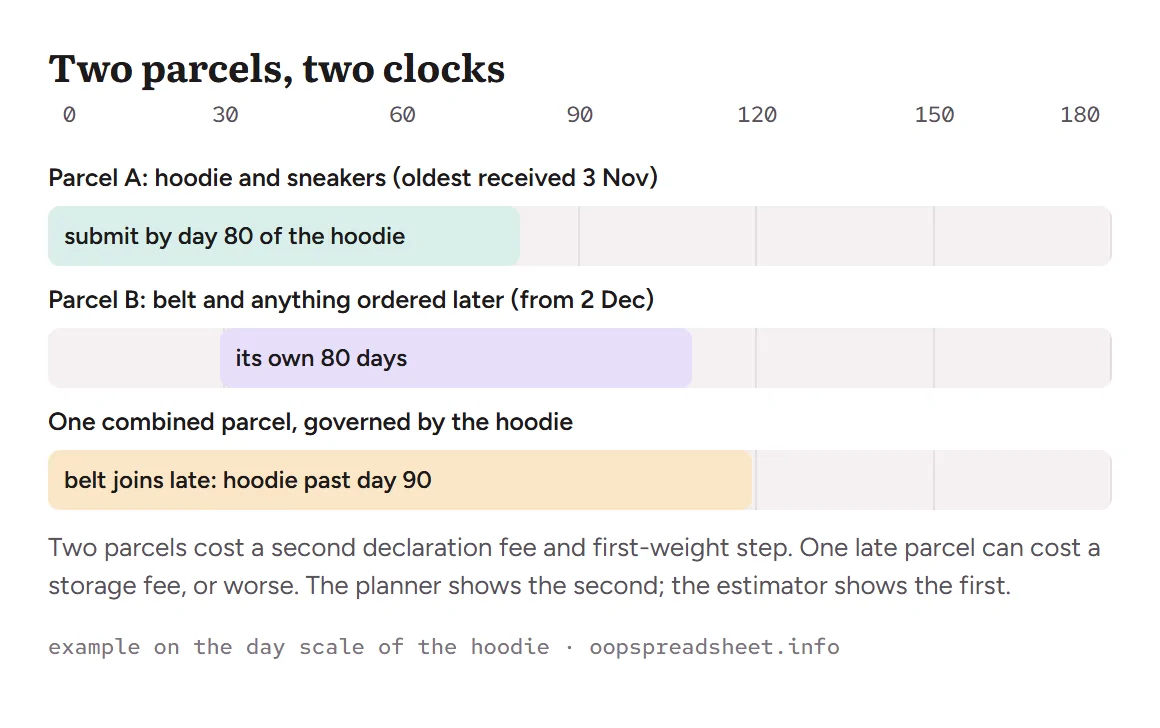
Splitting is the tool that keeps every item inside its free period. Put the items that arrived early into parcel A and submit it by day 80 of the oldest one. Anything that arrives later starts parcel B, which runs on its own clock from its own oldest item.
The cost of splitting is visible in advance: a second customs declaration fee, generally 8 CNY, and a second first-weight step on most lines. The cost of not splitting is not visible until it lands, and under V2 it can be the whole parcel. Run both in the estimator if the numbers are close.
Plan · worked example
A worked example with three arrival dates
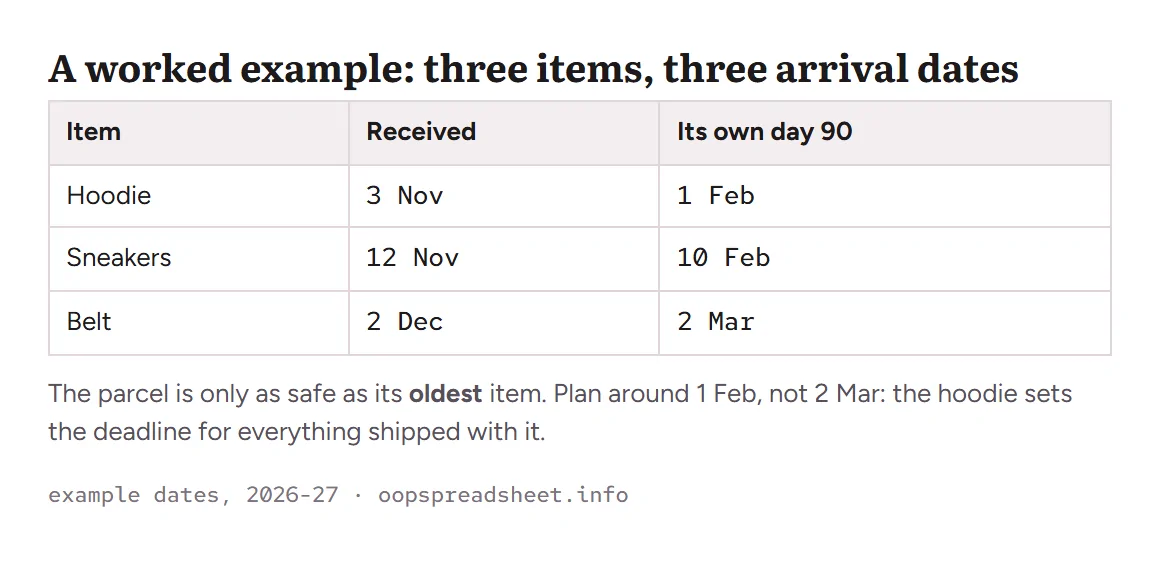
A hoodie reaches received on 3 November, sneakers on 12 November, a belt on 2 December. Their day-90 dates are 1 February, 10 February and 2 March. A parcel holding all three is governed by the hoodie: submit by about 22 January (day 80 for the hoodie) leaving a buffer before its normal free-storage reference, subject to the account deadline.
If the belt is late and you would rather not split, the planner shows what keeping the hoodie past 1 February would cost under each version. Usually the answer is to ship the first two and let the belt start the next parcel.