Home / Day 90
The last free day: what Oopbuy's pages say happens when free storage ends
Day 90 is the one date all four versions share. Here is what happens around it: the warning email, the status change, the sentence that calls unshipped goods abandoned, and the cases where a deadline matters even before day 90.
This page: the days around day 90
Day 85 to 90 · warning
The email, the status change and the fork
The Storage page promises one warning: “When the package is about to expire, you will receive an email notification from the system.” It does not say how many days before. Make sure the email address on your Oopbuy account is one you read, and check the spam folder in the last two weeks.
At day 90 the Customized logistics page has the sub-order change “from In Stock to Expired”. What happens next depends on which page you read, and two of the answers are on the same page.
Day 91 · same page
One page, two answers about day 91
Item 1 of the Storage page: “If the package waybill is not submitted or no feedback is given after 90 days, it will be considered as giving up the goods. We will dispose of the expired goods uniformly.” Related detail 3 of the same page: “If your package has exceeded the 90-day free storage period, you can extend the storage period at a cost of 10 CNY per 30 days.”
Both can hold if “feedback” means contacting Oopbuy to arrange the extension before day 90 ends. That is our reading. The page does not spell it out, and a buyer who waits until day 91 to pay is relying on detail 3 beating item 1. We would not.
Day 90 · the FAQ copy
The FAQ copy of the rule leaves the extension out
Oopbuy publishes the Storage text twice. The second copy is an FAQ titled How long can my product be stored in OOPBUY warehouse?. It repeats item 1, item 2 and the first two related details word for word. Then it stops. The line about extending at 10 CNY per 30 days is not there.
So a buyer who finds storage through the FAQ search rather than the footer reads a rule with a hard stop at day 90 and no paid option. That is a fifth shade of the same rule, and it points the same way as our advice: treat day 90 as the deadline and anything after it as a favour you have to ask for.
After expiry · disposal
What disposal means, and that nobody tells you
Two routes are named. The Shopping Guidelines and the Terms of Service both say unshipped goods may be handled “via points-mall redemption or compliant destruction”. The Storage page adds: “The destroyed goods will no longer be prompted or notified.”
The Terms of Service describe disposal as “performance of user-authorised entrusted acts” for which “the Platform bears no compensation liability”. In plain terms, by registering you agreed in advance that expired goods can be sold off for points or destroyed, and you will not be paid for them. The day-120 page covers when that becomes likely.
Before day 90 · perishables
Things to watch out for before day 90: shelf life is not storage
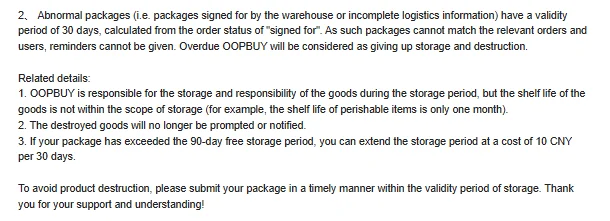
Related detail 1 of the Storage page draws a line people miss: Oopbuy is responsible for the goods during storage, “but the shelf life of the goods is not within the scope of storage (for example, the shelf life of perishable items is only one month)”.
So the 90 days protect an item's whereabouts, not its condition. Snacks, cosmetics with a use-by date and anything that degrades on a shelf can be ruined well inside the free period, and that is not a warehouse fault. Buy those last, ship them first, or buy them locally. Liquids and powders also need a word with support before ordering, per the Shopping Guidelines.
Day 90 · evidence
The page itself, lower half
The screenshot shows the part of the Storage page that the day-90 decisions hang on: the abnormal-package clock, the three related details and the closing line, “To avoid product destruction, please submit your package in a timely manner within the validity period of storage.”
That closing sentence is the clearest instruction Oopbuy gives anywhere about storage, and it does not mention extensions at all. If you take one sentence from this page into your own planning, take that one, then use the planner to turn it into a date.