
Home / Day 120
The Abandoned line: where two Oopbuy documents stop storage
Day 120 is not on the Storage page, but it appears in two other Oopbuy documents and is implied by a third. Past it, your items can be marked Abandoned, turned into points-mall stock or destroyed. Here is what each document says and what counts as acting in time.
This page: the days around day 120
Day 120 · sources
Three documents that point at day 120
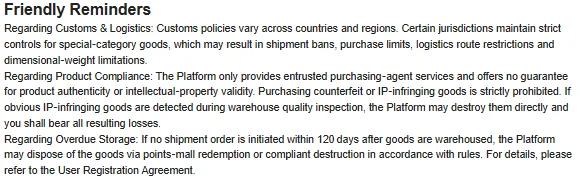
The Customized logistics page is explicit: past a total of 120 days the sub-order is “marked as Abandoned, and the warehouse will have the right to dispose of the goods accordingly”. The Shopping Guidelines arrive at the same number from a different direction: “If no shipment order is initiated within 120 days after goods are warehoused, the Platform may dispose of the goods via points-mall redemption or compliant destruction.”
The Terms of Service carry no number, only “beyond the permitted period”. Two documents with 120 and one without is a stronger signal than any of the four storage versions on its own. If you take a hard limit from anywhere on Oopbuy, take this one.
Day 120 · guidelines
The Shopping Guidelines sentence in context
The 120-day line sits at the end of the Friendly Reminders block in the Shopping Guidelines, after two notes about customs and product compliance. It is easy to miss because the block opens with general advice, and storage only comes up in its last paragraph, “Regarding Overdue Storage”.
Notice the verb: the platform “may” dispose. Nothing says it will do so on day 121. But nothing protects you either, and the same document says the details are in the User Registration Agreement, which, as the next section shows, does not contain them.
Day 120 · the missing clause
The agreement it points to has no storage clause
“For details, please refer to the User Registration Agreement,” the Guidelines say. We read the User Registration Agreement in full on 10 October 2026. It covers seller choice (it suggests Taobao stores with three hearts or more), customs and confiscation, compensation limits and prohibited goods. It does not mention storage periods, extension fees or the points mall.
So the detail the Guidelines promise is not where they send you. The Terms of Service make the same cross-reference. Until Oopbuy fills that gap, the most specific text available is the 120-day line itself.
Day 120 · what counts
What counts as acting in time
The Guidelines measure day 120 against a “shipment order” being initiated, which on Oopbuy means selecting items in the warehouse and submitting a parcel. The Storage page talks about the “waybill” being submitted. Neither says whether a submitted parcel that you have not paid for stops the clock.
Our advice is to finish both steps, submit and pay, well before the line. A parcel waiting for payment is still your goods sitting on Oopbuy's shelf, and the documents give the warehouse room to treat it that way.
Day 60 to 121 · drift
How a parcel drifts past day 120 without anyone deciding it should
Nobody plans to leave goods on a shelf for four months. It happens in small steps. A seller is slow, so the parcel waits. The expiry email arrives while the last item is still crossing China. It lands, everything else now shows Expired, and a sale is coming, so the parcel waits again. Each step is reasonable. Together they cross a line that two documents say allows disposal, with no notice required.
The fix is a rule you set at the start rather than a decision you make at day 110: the oldest item ships by day 80, with or without the late one. Late items start the next parcel and get their own 90 days. It costs a second declaration fee. It does not eliminate route, handling, delivery or storage risks.
Past day 90 · checklist
If you are already past day 90
Do not wait for an email. Open your warehouse list, note each item's status and sub-order number, and send support one message that names the three conflicting pages and asks for a date and a price. Keep the reply with its date.
Then act on the answer the same day. If support quotes a fee, pay it and record the new end date. If support says the items must ship, submit and pay for the parcel at once, even if it means leaving a late item behind. The six-month page has the message ready to paste.